Lost my way at re:Invent? Let the AI Agent guide you up!
Fiddling around with the Events Catalog API, Lambda Web Functions and AgentCore to navigate across the reInvent venues and schedule.
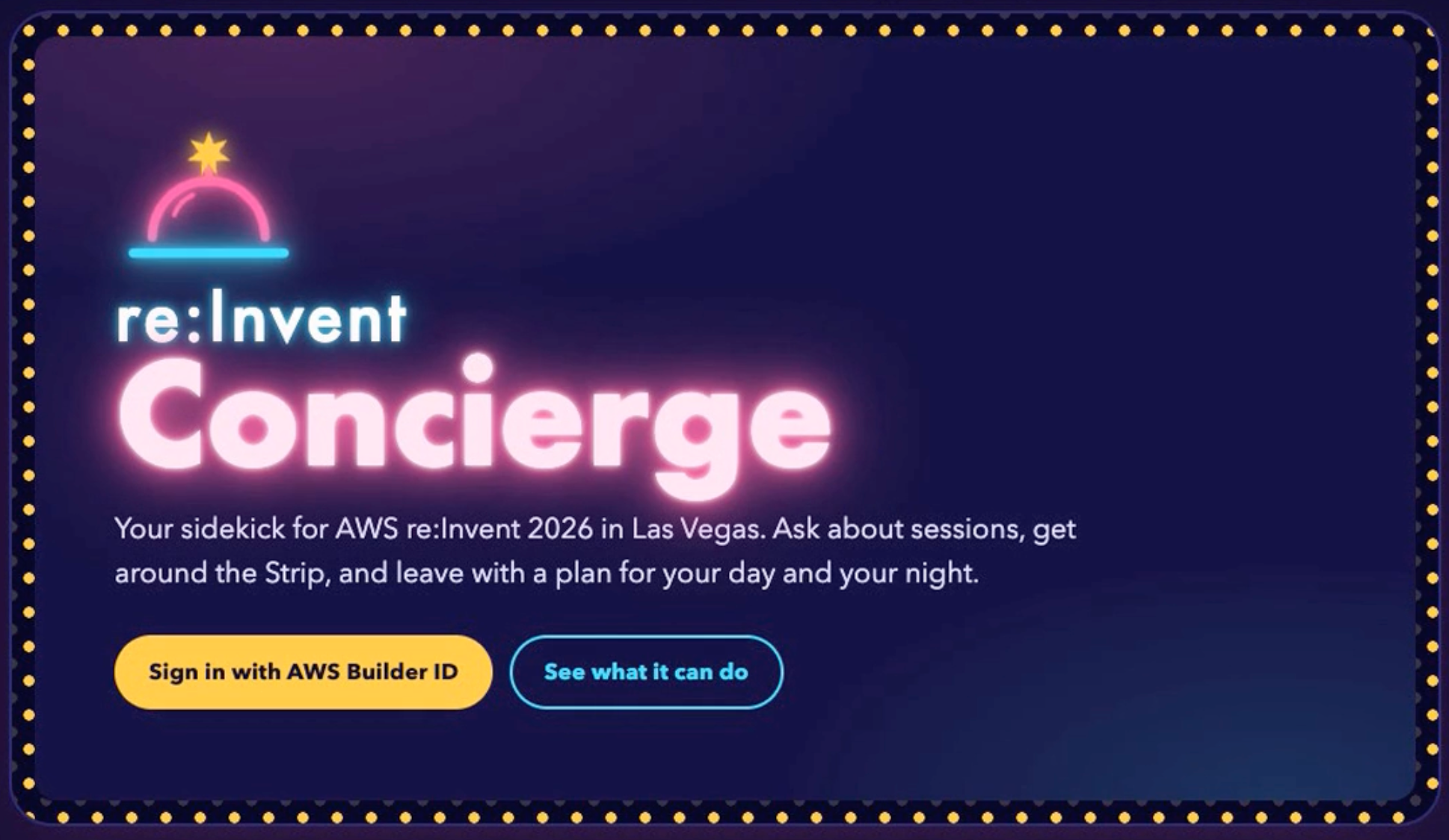
How often do we love a concierge service? And guess what, re:Invent is the place to have it and flaunt about it. AWS re:Invent having like a thousand sessions with afterparties, side line sessions and networking events, as an attendee you want to be part of it!
I have these things on my mind every re:Invent
- How do I know if there are other sessions that match the session I liked - sessions level, theme, architecture.
- I can't be at 2 places, so how do I plan my commute because it happens all across the Vegas Strip.
- Walking? I always lose my way just in the Venetian casino area, how should I go now.
- Parties at night!!! Hell yea!
AWS just opened up the Events Catalog API which gives you access to all the sessions at AWS Events like re:Invent and event Summits across the globe. The project, re:Invent Concierge, is a chat assistant that searches sessions, validates plans for conflicts and travel time, changes your schedule (with permission), and exports .ics files and a printable route guide. I tried to build this as part of the Hackathon but only to realize on the last day, I need an invite.
Quick demo
https://www.youtube.com/watch?v=O8YEeEZTFjc
Let's look into it's Architecture
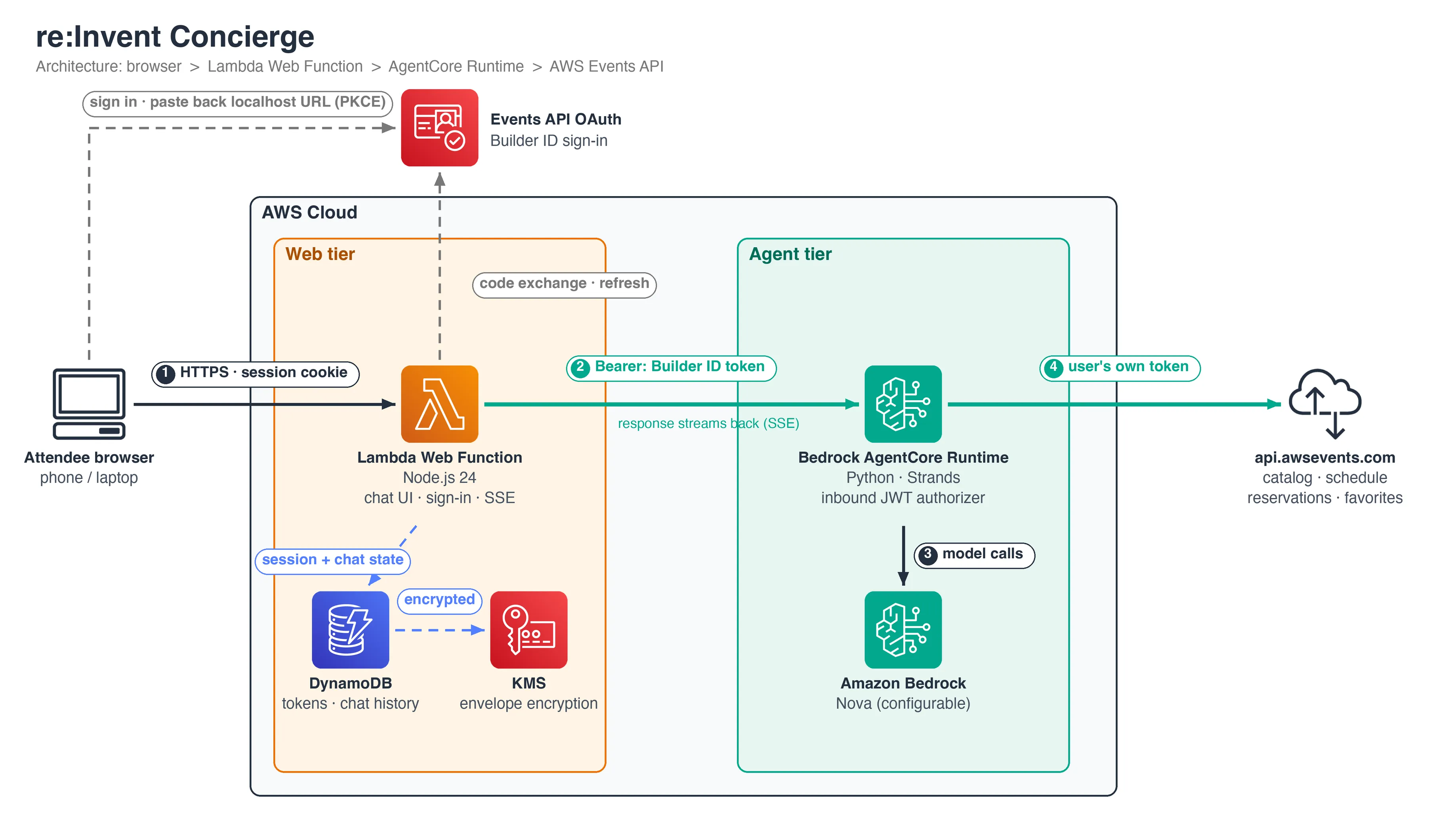
There are two compute tiers with a clear split of responsibilities:
- The web tier owns the user, meaning identity, sessions, tokens, chat history, and the UI.
- The agent tier owns reasoning and tools, and has no persistent state of its own.
The web tier: a Lambda Web Function
The front end runs as a Lambda Web Function. It's a long-running HTTP server (here, plain Node.js) that Lambda scales by environment rather than by invocation. That suits a chat app for two reasons:
- Streaming. Answers can take 30 seconds as the model calls tools, and the UI streams them as server-sent events. A conventional request/response function is a poor match for that.
- Shared work per environment. One event loop serves many concurrent chats (configured at 50 per environment, 2 GB memory, a small cap on environments), and scale-to-zero keeps an idle personal app close to free.
The web tier serves the static chat UI, runs the sign-in flow, keeps tokens, and proxies each chat turn to the agent.
The agent tier: AgentCore Runtime and Strands
The agent is a Python app built with the Strands Agents SDK and hosted on Amazon Bedrock AgentCore Runtime. It's deployed from the AgentCore CLI as a CDK stack, with the runtime declared in a single agentcore.json. The model is a deploy-time setting (MODEL_ID), defaulting to Amazon Nova 2 Lite. Switching to an Anthropic model on Bedrock is a one-variable redeploy, provided your account has access to it.
AgentCore's inbound JWT authorizer matters most here. The agent doesn't use IAM auth and doesn't need a gateway. It validates the user's own Builder ID access token against the Events API's Cognito issuer, and the Authorization header is allowlisted through to the container. The tools then call api.awsevents.com as the attendee, with that same token. Authorization comes down to the user's own identity at every hop. The agent never holds a shared credential that can see anyone's schedule.
The tools defined for the agent to operate
| Area | Tools |
|---|---|
| Discover | search_sessions (day, venue, type, level, time window, speaker, "not full"), get_session_details, find_similar_sessions |
| Navigate | venue_guide (six venues, directions by walking, shuttle, or Monorail, with map links), navigation_guide (a personal day-guide page with a route map and leave-by times) |
| Evenings | find_parties (community-maintained listings, filtered by time and proximity) |
| Plan | check_itinerary (overlaps, too-tight transfers, free gaps) |
| Your schedule | get_my_schedule, reserve_sessions, cancel_reservation, add_favorites, remove_favorite, add_personal_time |
| Export | export_calendar (.ics for Google, Outlook, Apple) |
Not the Auth flow I imagined
While if I just wanted to list all the events with ListEvents of the Event Catalog API, there wasn't any sign-in required but this was supposed to be a personalized experience which means the users have to sign into AWS Builder Center. But what do you know! There isn't an easy way to integrate the SSO sign-in with Amazon Cognito as well.
Based on this architecture, Lambda Function is running on NodeJS and it's the Lambda Web Function which is a HTTP host. And its the OAuth client.
- Start sign-in.
POST /auth/startgenerates a PKCE verifier, challenge andstate, and returns the authorize URL withidentity_provider=AWSBuilderID. The server keeps the verifier andstate, keyed by the session cookie. - User signs in at
oauth.awsevents.com. - Callback. This is where the Lambda URL runs into a limit. The client is registered only for
http://localhost:8484–8489/callback. A callback straight to your Lambda URL fails withredirect_mismatch. So the browser lands on a dead localhost page, and the user pastes that URL into the app. - Exchange.
POST /auth/completechecksstate, then POSTs to/oauth2/tokenwith the code and the stored verifier. There is no client secret. - Store and use. Keep the tokens server-side, encrypted (KMS and DynamoDB here). The browser only gets an opaque session cookie. Refresh before the 60-minute expiry. Pass the access token to the API or agent as a Bearer token.
- Sign out. Revoke the refresh token, delete the session, and optionally redirect to the Builder ID logout URL.
The Builder ID token has to passed to the Lambda Web Function and also AgentCore with managing the refresh tokens.
Token and chat storage
Tokens are stored server-side only. The browser holds an opaque session cookie and never sees a Builder ID token. They're kept in DynamoDB with:
- KMS envelope encryption with an app-scoped encryption context, and an IAM condition that pins decrypt rights to that context
- A TTL on every item
- The table itself encrypted with the same customer-managed key (rotation on)
Chat history is saved per Builder ID (90 days) so conversations follow you between phone and laptop. AgentCore sessions idle out after 30 minutes. When a chat resumes after that, or on another device, the web tier replays the last 20 messages and the agent picks up from them. Calendar files and navigation guides are tied to your identity and kept 30 days.
Try it yourself
The project deploys with one script that stands up the AgentCore runtime (CDK), the support stack (KMS, DynamoDB, IAM), and the Web Function:
./deploy.sh
# or pick a different Bedrock model:
MODEL_ID=us.anthropic.claude-sonnet-5-5 ./deploy.sh
For local development, you can run the agent on its own against a public event catalog and the web tier with an in-memory store, with no AWS sign-in needed.
About the author
A Developer Advocate experiencing DevRel ecospace at Freshworks. Previous being part of the start-up Mobil80 Solutions based in Bengaluru, India enjoyed and learnt a lot with the multiple caps that I got to wear transitioning from a full-stack developer to Cloud Architect for Serverless!
An AWS Serverless Hero who loves to interact with community which has helped me learn and share my knowledge. I write about AWS Serverless and also talk about new features and announcements from AWS.
Speaker at various conferences globally, AWS Community, AWS Summit, AWS DevDay sharing about Cloud, AWS, Serverless and Freshworks Developer Platform
Comments
Join the discussionNo comments yet. Be the first to comment.