# Handling errors with StepFunctions SNS SDK integration
[AWS Step Functions](https://aws.amazon.com/step-functions/) is a way of designing several server-less workflow orchestrations.
When integrating with different states, there could be times when the state fails, resulting in failure of the complete execution. Like any error-handling techniques in a programming language, with *Step Functions*, we can also follow certain error handling techniques to gracefully terminate or retry the execution.
In this blog post, we will look at how *Step Functions* error handling techniques could be used with states which have an SNS SDK integration.
### Error handling on Step Functions
[AWS Step Functions](https://aws.amazon.com/step-functions/) natively supports error-handling with the `catch` definition.
The exceptions could occur for various reasons where the state could fail such as -
* The state is unable to fetch/read parameters from the event passed from the previous step or invocation event JSON.
* The state which uses SDK integration could be missing the needed permission to invoke the respective SDK API.
* The processing time of the state could time-out.
The error names such as - `DataLimitExceeded`, `Timeout`, and `Permissions` define the reason for exception and the necessary steps to take to resolve it. Based on the errors, as a workflow designer, you can define if you would like to `retry` based on the error name or would want to handle with a `catch`.

You can read more about error handling in Step Functions [here](https://docs.aws.amazon.com/step-functions/latest/dg/concepts-error-handling.html).
### Understanding the workflow
In this workflow, we will use multiple states. These states invoke different AWS Services that are executed in a parallel manner with `Parallel`. If any of the services result in an error, the parallel state also stops.
`catch` then gets executed with the state which integrates SNS SDK to publish to a specific topic about the error information.
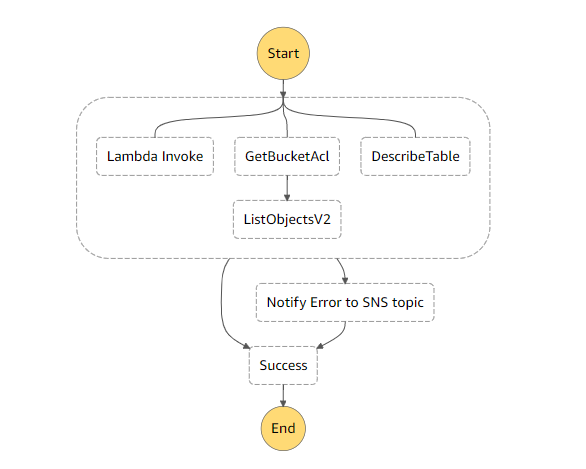
The *parallel state* executes - *Lambda fn invocation*, S3 SDK integrations for *GetBucketACL*, *ListObjectsV2* and the third parallel flow is using DynamoDB SDK integration for *DescribeTable*.

The `catch` is defined in the *parallel state*, and that `catch` then executes the step, *Notify Error to SNS topic*. This takes the complete error as input from the *parallel state*, and it maps the `input` to SNS SDK `Publish` API's `Message` parameter.

Based on the *parallel state*, if an error occurs, either *Notify Error to SNS topic*, or *parallel state* is considered to be successfully executed as `Success state`.
With this workflow, if the execution encounters an exception, then it gets handled with SNS SDK integration and terminated with `success`. If all is well, then all the states in the *parallel state* also end with a *success state*.
```JSON
{
"Comment": "State machine to demonstrate error handling with SNS SDK integration",
"StartAt": "Parallel",
"States": {
"Parallel": {
"Type": "Parallel",
"Branches": [
{
"StartAt": "Lambda Invoke",
"States": {
"Lambda Invoke": {
"Type": "Task",
"Resource": "arn:aws:states:::lambda:invoke",
"OutputPath": "$.Payload",
"Parameters": {
"Payload.$": "$",
"FunctionName": "arn:aws:lambda:us-east-1:xxxxxxxx:function:ErrorSNSDemo:$LATEST"
},
"Retry": [
{
"ErrorEquals": [
"Lambda.ServiceException",
"Lambda.AWSLambdaException",
"Lambda.SdkClientException"
],
"IntervalSeconds": 2,
"MaxAttempts": 6,
"BackoffRate": 2
}
],
"End": true
}
}
},
{
"StartAt": "GetBucketAcl",
"States": {
"GetBucketAcl": {
"Type": "Task",
"Parameters": {
"Bucket": "textract-sample-bucket"
},
"Resource": "arn:aws:states:::aws-sdk:s3:getBucketAcl",
"Next": "ListObjectsV2"
},
"ListObjectsV2": {
"Type": "Task",
"Parameters": {
"Bucket": "textract-sample-bucket"
},
"Resource": "arn:aws:states:::aws-sdk:s3:listObjectsV2",
"End": true
}
}
},
{
"StartAt": "DescribeTable",
"States": {
"DescribeTable": {
"Type": "Task",
"Parameters": {
"TableName": "TextractKeywordsDB"
},
"Resource": "arn:aws:states:::aws-sdk:dynamodb:describeTable",
"End": true
}
}
}
],
"Catch": [
{
"ErrorEquals": [
"States.ALL"
],
"Next": "Notify Error to SNS topic",
"ResultPath": "$"
}
],
"Next": "Success"
},
"Success": {
"Type": "Succeed"
},
"Notify Error to SNS topic": {
"Type": "Task",
"Resource": "arn:aws:states:::aws-sdk:sns:publish",
"Parameters": {
"TopicArn": "arn:aws:sns:us-east-1:xxxxxxxx:ErrorNotification",
"Message.$": "$"
},
"Next": "Success"
}
},
"TimeoutSeconds": 20
}
```
Note : On creating the state machine, an IAM role is created, but the auto-created policies currently don't include the SDK based API policies. You would have to add the policies to the IAM role when it's created.
### Different workflow executions
#### **Execution 1** : When IAM role doesn't have `dynamodb:DescribeTable` permission.
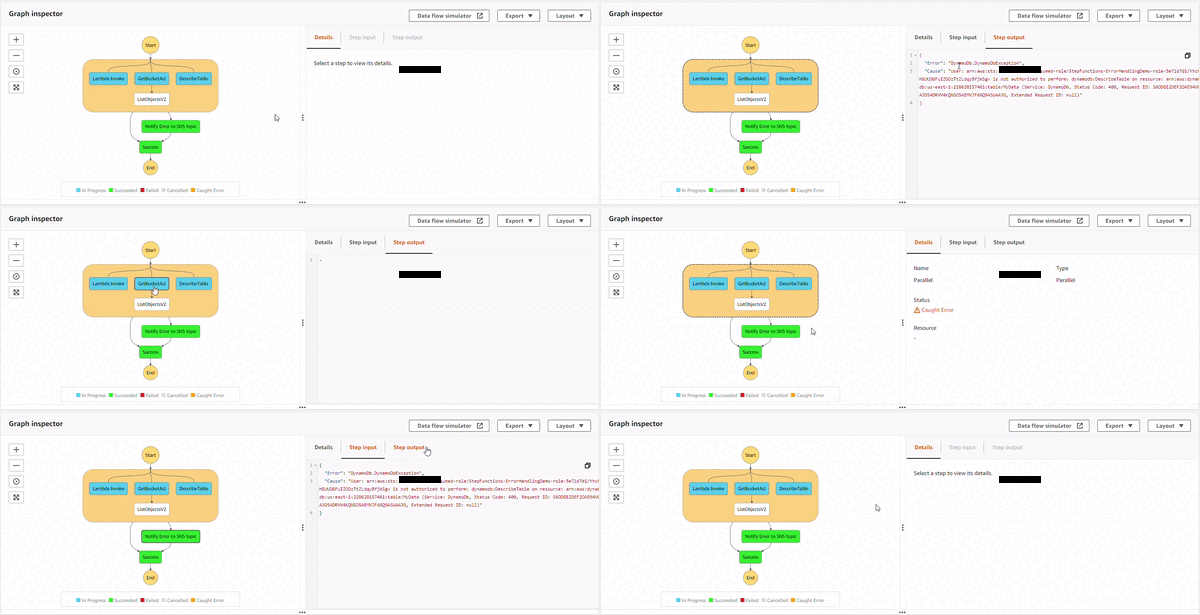
The *parallel state* starts the execution of all the three sub-processes, and as DynamoDB `DescribeTable` API starts, the IAM policy doesn't allow it. This causes an error, `DynamoDb.DynamoDbException`. Then, the *parallel state* catches it, and executes the *Notify Error to SNS topic state*. The topic has an email based subscriber which receives the following JSON based email.

#### **Execution 2** : When IAM role doesn't have **S3** permission.
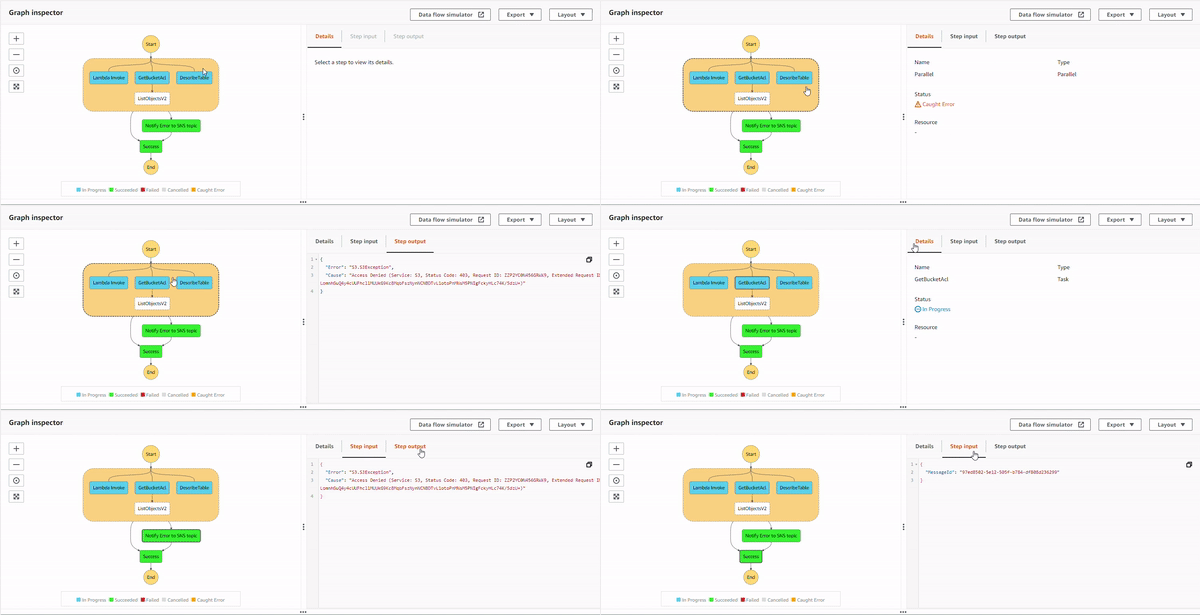
The *parallel state* starts the execution of all the three sub-processes, and as S3 `GetBucketAcl` API starts executing, the IAM policy doesn't allow it. This causes an error, `S3.S3Exception`. The *parallel state* catches it, and executes the *Notify Error to SNS topic state*. The topic has an email based subscriber which receives the following JSON based email.

#### **Execution 3** : When IAM role doesn't have `s3:ListObject` permission but has `s3:GetBucketAcl`.
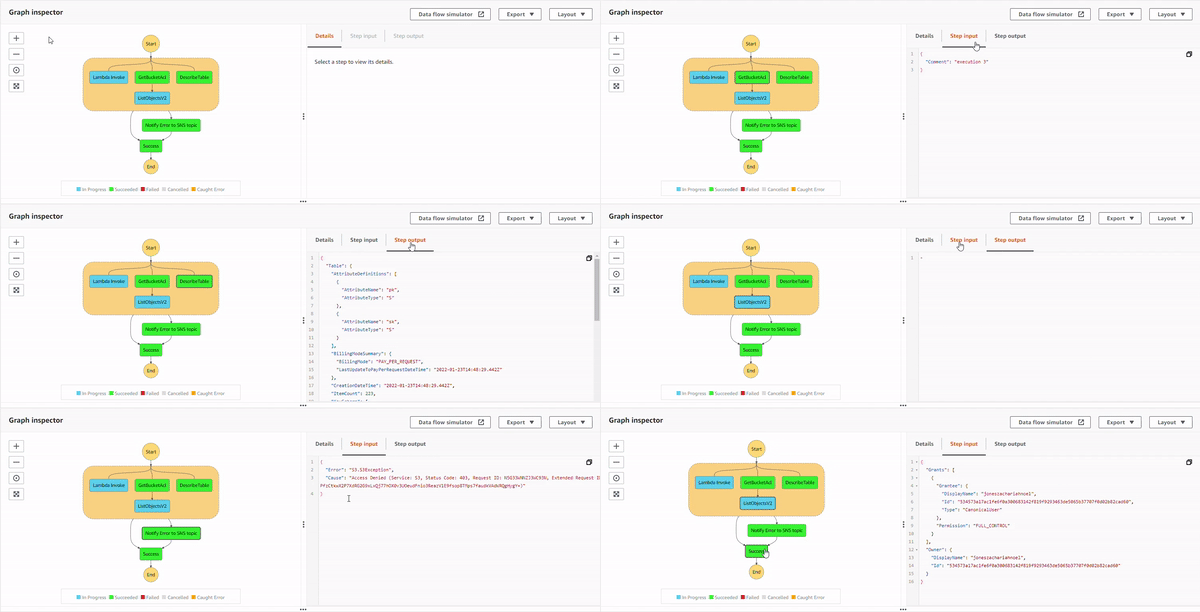
The *parallel state* starts the execution of all the three sub-processes, and as the S3 process flows, it successfully executes `GetBucketAcl` API. Then, it shows a response, but for `ListObjectv2` API, IAM policy doesn't allow it. This causes an error, `S3.S3Exception`. And the *parallel state* catches it, and executes the *Notify Error to SNS topic state*. Additionally, the DynamoDB operation was successful as well, as it was executing in a parallel manner. The topic has an email based subscriber which receives the following JSON based email.

#### **Execution 4** : All permissions added.
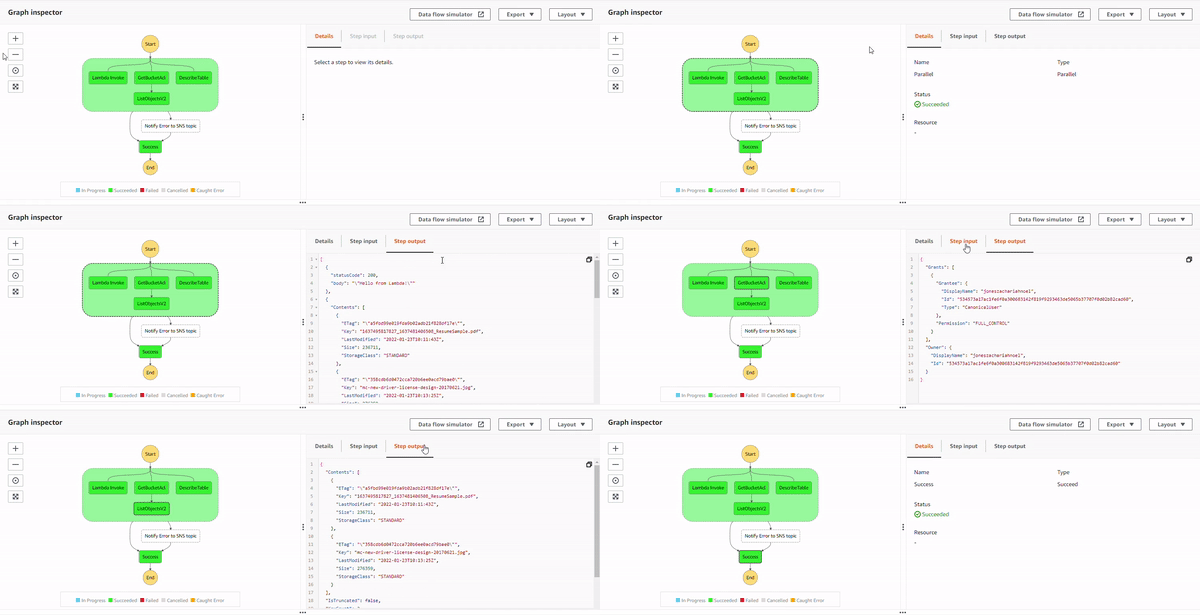
With all the permissions, the states execute successfully, and because there is no exception, *Notify Error to SNS topic state* doesn't get executed.
##### **Execution 5** : When Lambda function throws an error.
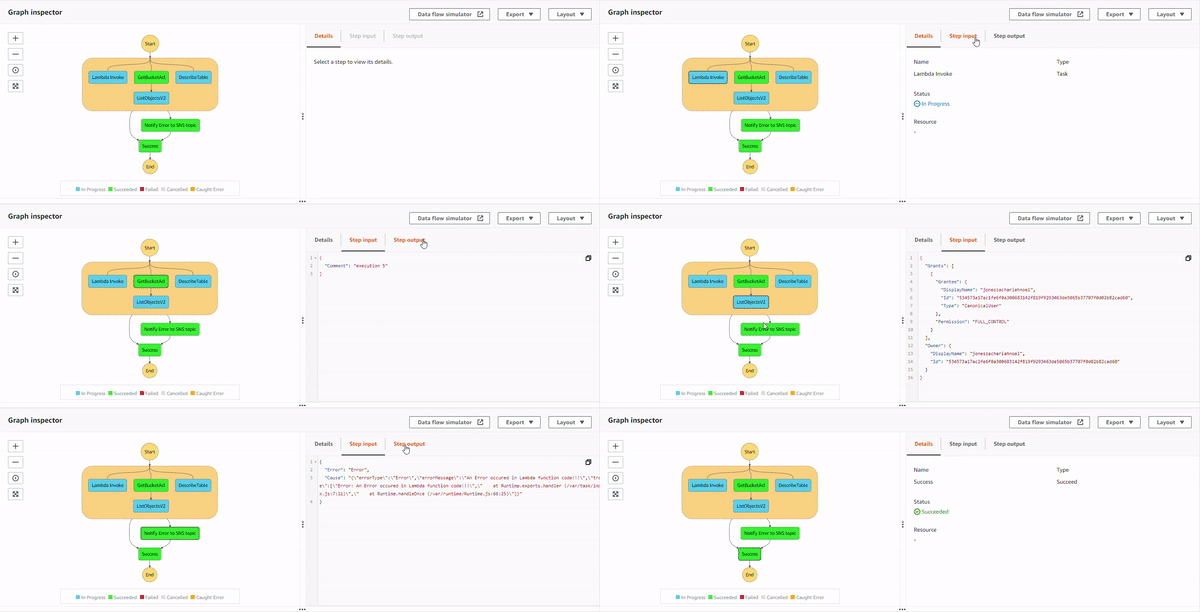
With all the permissions, programmatic errors resulting from your Lambda function code are also handled with `catch`. In the Lambda function, NodeJS runtime added a snippet to throw an error.
```JavaScript
exports.handler = async (event) => {
// TODO implement
const response = {
statusCode: 200,
body: JSON.stringify('Hello from Lambda!'),
};
throw new Error("An Error occured in Lambda function code!!!")
// return response;
};
```
This error is caught and gracefully handled with the *Notify Error to SNS topic state*, which is notified via email.

### Conclusion
With the error handling techniques provisioned by Step Functions, you can gracefully handle the errors. These errors could be resolved in different AWS SDK integrations with the supported 200+ services for a more automated error handling.